

Spot Celebrations allow managers and team members to send a recognition gift to a colleague at any time, outside of automated milestones. When an approval flow is configured on a Spot Celebration program, gift sends are held for review before the recipient is notified. This gives your organization visibility and control over how recognition budgets are used.
Sending a Spot Celebration
Navigate to Spot Celebrations at app.hithrive.com/spot-celebrations and click Send a spot celebration.

The send flow has two main steps:
Step 1: Select your recipient
Choose the team member you want to recognize.
Step 2: Select a gift
Attach a gift to your celebration, or skip this step if you want to send a card only. If you are attaching a gift:
Gift options are shown based on the recipient's country
You can offer the recipient a choice by adding multiple gift options using + Add gift option
You can send additional gifts using + Add additional gifts
Under Gift cost, use the Choose a budget dropdown to select the program budget this send should be drawn from
When sending from a budget or allowance, the maximum gift cost will be deducted upfront. If the recipient selects a gift at a lower value, your budget will be credited for the difference.
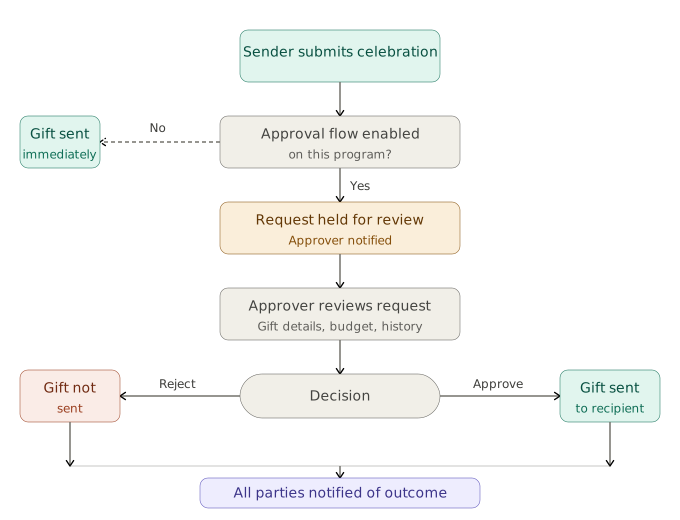
Once submitted, if the selected program has an approval flow enabled, the send will be held for review rather than delivered to the recipient immediately.
The approval flow
After submission, the request moves through the configured approval chain. Each approver reviews the following before taking action:
Field | Description |
|---|---|
Sent by | The team member who initiated the gift send |
Recipients | The intended recipient(s) |
Gift options | The gift selection and eligible countries |
Send date | When the request was submitted |
Max gift cost | The maximum point value of the gift |
Budget | The budget the gift will be drawn from |
Remaining budget | What is left in that budget after this send |
Moderation history | A timestamped log of all actions taken in the flow |
Notifications
Approver notified: When a request reaches an approver, they receive a notification prompting them to review and act
Sender updated: The sender is notified if their request is approved, rejected, or if action is needed
Final notification to all parties: Once a final decision is reached, every team member in the approval flow receives a notification with the outcome
The recipient is only notified after final approval is granted.
How to approve or reject a request
Approvers can access pending requests from the Pending approval tab within Spot Celebrations, or go directly to app.hithrive.com/spot-celebrations/moderate.
Click into a pending request to review the details
Review the gift options, budget, remaining balance, and moderation history
Scroll to the bottom of the moderation panel and select Approve or Reject
Every action is logged with a timestamp and the name of the approver who took it.
After a final decision
If approved: The gift notification is delivered to the recipient and the send is recorded against the associated budget.
If rejected: The gift is not sent and the budget is not affected. The sender receives a notification with the outcome.
Approval flow configuration is managed at the program level by an administrator. To update who is included in an approval flow or adjust the flow structure, contact your HiThrive administrator.